USB
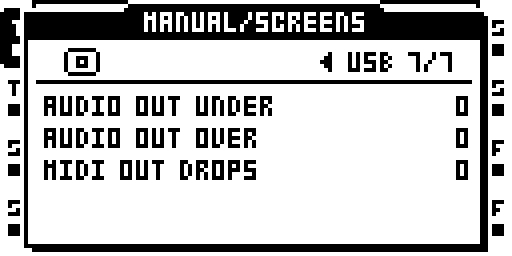
BRAIN performance: USB counters.
Connect the Octatrack to a computer for USB MIDI and audio. USB storage mode (DISK MODE) works as in stock OS.
The computer sees one device with MIDI in and out, an audio input (the Octatrack's output) and, with IN set, an audio output (the computer's channels into the Octatrack's inputs). Audio is 44.1 kHz, 24-bit (UAC2).
Settings
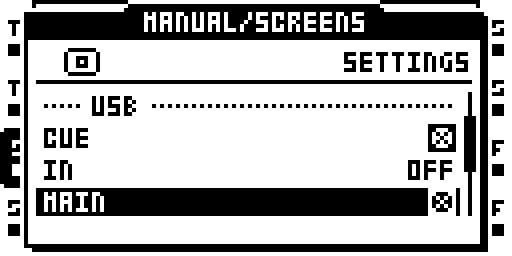
PROJ > BRAIN > SETTINGS, the USB group. * marks a value that takes effect
at the next boot.
| Setting | Default | Values | What it does |
|---|---|---|---|
| TRACKS | PRE | OFF, PRE, POST | Sends the 16 track channels to the computer: tracks 1 to 8, track N on channels 2N-1 and 2N. PRE is before the track's LEVEL, the crossfader, MAIN volume and the master effects. POST is after each track's own LEVEL, mute and solo; MAIN volume is not applied. |
| MAIN | ON | OFF, ON | Sends the MAIN mix (2 channels), the signal sent to the MAIN outputs. It includes LEVEL, the crossfader, MAIN volume and the master effects. |
| CUE | ON | OFF, ON | Sends the CUE mix (2 channels). |
| MASTER | OFF | OFF, ON | Sends track 8's left and right (2 channels). |
| IN | OFF | OFF, AB, CD, ABCD | Takes the computer's channels in as Octatrack inputs. AB: computer channels 1 and 2 are inputs A and B, and C and D stay on the jacks. CD: the same on C and D. ABCD: computer channels 1 to 4 are inputs A to D. |
| MIDI | ON | OFF, ON | USB MIDI in and out. With MIDI OFF the computer sees storage and audio only, and the audio interface numbers change. |
The channels the computer receives are the ones switched on, in the order TRACKS, MAIN, CUE, MASTER. The counts are 0, 2, 4, 6, 16, 18, 20 or 22 channels. With the defaults it is 20: channels 1 to 16 are the tracks, 17 and 18 are MAIN, 19 and 20 are CUE. At USB full speed the stream is two channels, the stereo sum.
IN needs at least one of TRACKS, MAIN, CUE or MASTER switched on, because the computer's stream is timed from the Octatrack's output. If none is on, changing IN shows IN NEEDS AN OUTPUT STREAM and IN stays OFF. IN is served at USB high speed only.
Changing a setting
- Open PROJ > BRAIN > SETTINGS. The USB group lists CUE, IN, MAIN, MASTER, MIDI and TRACKS.
- Move to a row with UP and DOWN.
- Press YES to step through the values, or LEFT and RIGHT to step down and up, stopping at the ends.
- Leave SETTINGS:
REBOOT TO APPLY CHANGESappears. Switch the Octatrack off and on; the USB values take effect at the next boot, and the computer sees the new device when it starts. The values are kept inBRAIN/card.workon the card.
USB MIDI
MIDI in and out over USB, mirroring the DIN ports. The sequencer, time stretch, the LFOs and the FX follow USB MIDI clock.
A burst of output, such as the 283 CCs of a CC 61 dump, is queued and sent in order. Up to about 4 KB can wait for the computer to read; messages past that are dropped and counted in the USB tab. Before this, a burst longer than 256 bytes lost its tail.
The Octatrack follows one clock at a time, and DIN comes first. While MIDI clock is arriving on DIN, USB clock, START, STOP, CONTINUE and song position are ignored. USB takes over about a sixth of a second after the last DIN clock. Before this, both clocks together doubled the tempo.
Audio in
With IN set, the computer's channels are the Octatrack's inputs, as described under IN above. While the computer's stream is closed, the jacks are the inputs.
Reading USB activity
PROJ > BRAIN > PERFORMANCE, the USB tab.
The USB tab counts audio underruns and overruns and dropped MIDI output messages. It reads NOT IN THIS IMAGE when the image has no USB module.
Settings
| Setting | Values | In this image | Takes effect | What it does |
|---|---|---|---|---|
| TRACKS | OFF / PRE / POST | PRE | at the next boot (stored on the card) | the 16 track channels to the host, PRE (the read-back arena) or POST (post-fader, each track times its own MAIN gain), or OFF; takes effect at the next boot |
| MAIN | off / on | on | at the next boot (stored on the card) | the 2-channel MAIN mix in the host stream; takes effect at the next boot |
| CUE | off / on | on | at the next boot (stored on the card) | the 2-channel CUE mix in the host stream; takes effect at the next boot |
| MASTER | off / on | off | at the next boot (stored on the card) | track 8's L/R as a 2-channel pair in the host stream (refused with TRACKS on); takes effect at the next boot |
| IN | OFF / AB / CD / ABCD | OFF | at the next boot (stored on the card) | which inputs the host's channels stand in for (AB, CD, ABCD), or OFF for no host -> device stream; needs an output stream beside it; takes effect at the next boot |
| MIDI | off / on | on | at the next boot (stored on the card) | USB MIDI in/out on the device, or OFF for MSC + audio only; takes effect at the next boot |
Screens
BRAIN > SETTINGS, the USB group: CUE, IN and MAIN. A change to a value that takes effect at the next boot shows a popup when SETTINGS is left.
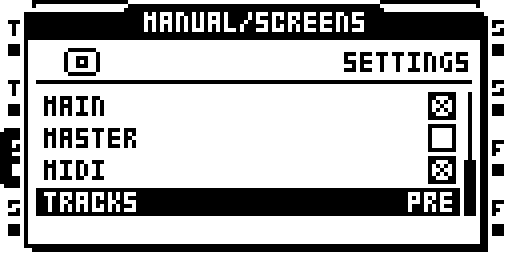
The end of the USB group: TRACKS.
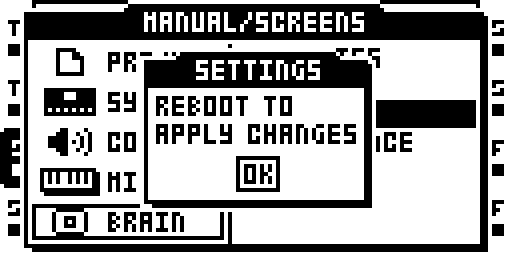
Leaving SETTINGS after TRACKS was changed: the popup says to reboot.