Kits
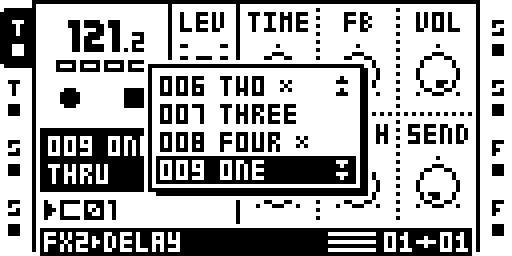
Kit selection for the current pattern.
255 Kits per project. A Kit is a saved Part with a name; each pattern plays the Kit assigned to it. Loading a Kit loads its Part.
A Kit holds the Part's machines, FX1 and FX2 selections and their pages, the LFO and AMP pages, the track levels and cue levels, the 16 scenes' locks, the LFO designer shapes and the MIDI tracks' parameters.
Not in a Kit, as with a Part: the samples (a Kit holds a slot number; the slot's file and settings are the project's), and everything the pattern holds — trigs, parameter locks, track lengths and scales. Nor the tempo, the arrangements, the track recorders or the project settings.
The Keys
| Action | MKII | MKI |
|---|---|---|
| LOAD KIT | PART | FUNC+MIDI |
| SAVE KIT | FUNC+PART | FUNC+MIDI, then FUNC+BANK |
| quick save (the Kit under the cursor, its name kept) | FUNC+PART, then FUNC+YES | FUNC+MIDI, FUNC+BANK, then FUNC+YES |
| reload the current Kit from the library (KIT RELOADED) | FUNC+CUE | FUNC+CUE |
| the pasted pattern plays a copy of its Kit in the next empty Kit | FUNC+PASTE, then PART while STOP is held | FUNC+PASTE+MIDI |
| save the Kit, copy it and the pattern to the next empty ones, play the copy | PTN+FUNC+RIGHT | PTN+FUNC+RIGHT |
| copy / paste / clear an inactive pattern of the current bank (paste or clear again: undo) | hold PTN and FUNC, press the pattern's TRIG; then REC / STOP / PLAY | the same |
The Lists
- LOAD KIT lists UNDO KIT (the Kit the current pattern had before
the last load), then the 255 Kits:
NNN name,*on a Kit no pattern plays,NNN ---on an empty one. YES on a Kit: the current pattern plays it, now. - SAVE KIT lists the 255 Kits, the cursor on the current Part's
(the first empty Kit when the slot holds none). YES opens the name
editor (seven characters,
NEW KITfor an empty Kit); the current Part is saved into the Kit and the current pattern plays it. - In either list, LEVEL moves the cursor a row per detent; UP and DOWN as stock.
- In either list, FUNC+REC copies the Kit under the cursor, FUNC+STOP pastes onto it, FUNC+PLAY clears it; the same paste or clear again on the same Kit undoes it. A copy is a snapshot of the Part, live edits included. A paste, clear or undo on the current pattern's Kit applies at once.
- With a list open, a pattern change moves the cursor to that pattern's Kit.
- The status line's Part field shows the current pattern's Kit as
NNN name,NNN ---when that Kit is cleared, and the slot's own number when none is assigned.
Notes
- Kits are per project, in the project directory.
- On the first load of a project without a Kits file, Octakit's
kits3a.workandkits3b.workare imported when present; those files are left on the card. - With MIDI SCENES in the remix, a Kit also carries the Part's scene lock table.
Status: on hardware: Sam's MKII (image A6, 6 Oct 2026): importing Octakit-format kit files, ems-octakit #5, STOP/PTN+TRIG/PLAY with the Rytm, a rejected bank file, power cycles; verify_kits under the port.
Module facts (developers)
255 Kits per project: PART = LOAD KIT, FUNC+PART = SAVE KIT (MKI: FUNC+MIDI, then FUNC+BANK); each pattern plays its Kit through the stock Part slots. Replaces the earlier Octakit implementation.
| Detail | Value |
|---|---|
| Author | sambanks |
| Category | Parts, Kits and scenes |
| Kind | cf_patch |
| Test status | on hardware: Sam's MKII (image A6, 6 Oct 2026): importing Octakit-format kit files, ems-octakit #5, STOP/PTN+TRIG/PLAY with the Rytm, a rejected bank file, power cycles; verify_kits under the port |
| Requires | STORE |
| Included in | octabam-bus, octabam-core, octabam-inserts |
On GitHub: https://github.com/sambanks/octabam/blob/main/modules/kits/README.md