Tempo Controls
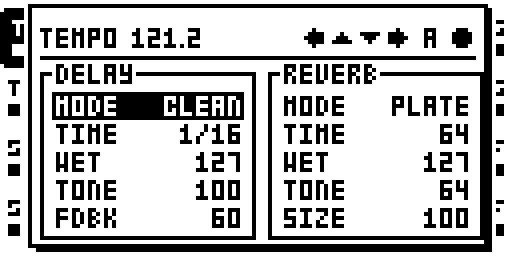
Delay and reverb controls in the TEMPO window.
In Octabam Bus, use the TEMPO window to view and edit the shared delay and reverb controls.
Controls
Press [TEMPO]: the window opens at the menu window's size, with two boxes, DELAY and REVERB, listing each engine's knobs with the values the host page would show.
| Control | Does |
|---|---|
| UP / DOWN | move the cursor a row in the focused box (the box scrolls, five rows visible) |
| A | edits the selected parameter on the host track (×7 while A is pushed is the stock fast turn) |
| B | the same as A |
| LEFT / RIGHT | focus DELAY / REVERB; each box keeps its own cursor |
| LEVEL | BPM in whole steps (×7 while LEVEL is pushed) |
| FUNC + LEVEL | BPM in 0.1 steps |
| [TEMPO], [YES], [NO] | close |
The header prints the tempo as TEMPO 121.2, or PTN 121.2 while the
pattern tempo is on.
The delay's knobs and the reverb's knobs list what the boxes show.
Status: on hardware: cursory testing on Sam's MKII (owner report, 16 Oct 2026); verify_set; carried by image 88 on Sam's MKII.
Module facts (developers)
The TEMPO window lists and edits BusDelay's and BusVerb's knobs (UP/DOWN = row, A or B = value, LEFT/RIGHT = engine, FUNC + LEVEL = 0.1 BPM).
| Detail | Value |
|---|---|
| Author | sambanks |
| Category | Effects: the bus |
| Kind | cf_patch |
| Test status | on hardware: cursory testing on Sam's MKII (owner report, 16 Oct 2026); verify_set; carried by image 88 on Sam's MKII |
| Included in | octabam-bus |
On GitHub: https://github.com/sambanks/octabam/blob/main/modules/tempo-bus/README.md