Octabam Inserts
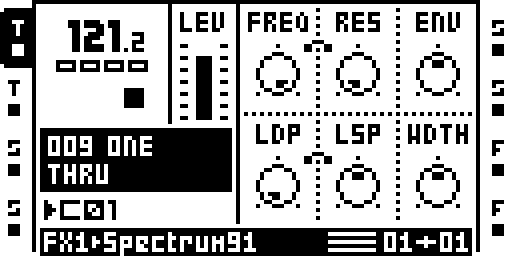
Spectrum, one of the insert effects
A remix of Octatrack OS 1.40C, built from your own copy of it, that adds the core modules and a set of effects that run on any track, on FX1 and FX2, with the stock DELAY. It has no bus and no SEND: every effect is an insert on its own track.
The Effects
Every effect below is an insert: it runs on any track, on the menus marked. The stock DELAY stays; the other stock effects give up their DSP words.
There is no SIDECHAIN_COMPRESSOR: it overlaps CHARACTER's own compressor, so stock COMPRESSOR keeps its id, undisturbed, with no side-chain KEY.
| Effect | FX1 | FX2 | Description |
|---|---|---|---|
| SPECTRUM | ✓ | ✓ | filter: Moog ladder, SEM, Capacitor2, formants |
| CHARACTER | ✓ | ✓ | fold, saturation, tilt, compressor, width |
| MODULATION | ✓ | ✓ | Juno, Dimension, flanger, phaser, comb |
| TRANSIENT | ✓ | ✓ | transient shaper (Ignorato) |
| EUCLID | ✓ | ✓ | Euclidean filter / amp sequencer (repeat98) |
| DELAY | — | ✓ | Stock delay. |
| GATE VERB | — | ✓ | Gated plate reverb with AMNT, GAIN, TIME, DIFF, TONE, and GATE controls. |
| LOFI2 | — | ✓ | Ring modulation or stereo frequency shifting, followed by sample-rate and bit reduction. |
The three stations are FX1-only in the bus remix; here each has its SLOTS build setting at FX1+FX2, so an FX2 instance runs live. LOFI2 runs on FX2 only: it needs more DSP than the FX1 slots leave. CHARACTER's KEY = T1 needs a BusDelay host, so in this remix it keys on the track's own input. The FX1 chooser lists NONE and the effects marked FX1; the FX2 chooser lists the effects marked FX2. A MODE turned on the panel re-defaults the knobs around it (the MODE DEFAULTS module).
The Core Modules
The same set as Octabam Bus. Every module in the image, credited to its author:
Full module list and authors
Memory Use
| Resource | Stock OS | Octabam Inserts |
|---|---|---|
| Sample and recorder memory | 14,602 pages | 12,895 pages (platform reserve) |
| Free DSP words (payload A / B) | — | 363 / 363 |
Where It Has Run
Port gates only: make check REMIX=octabam-inserts and the reach round. Not
on a unit; MUTE_MODES from DRAM, BRAIN and CC MAP's regenerated bytes have
not run on one.
Build and Install
The build and flash guide has every step, from what to install to the way back to stock. For this remix:
- Build. Pick a build number; it becomes the OS version the unit shows.
make image REMIX=octabam-inserts BUILD=91
- Back up the card. KITS writes
kits.workinto each project it loads. - Old projects. For a project made before this remix, on the card:
python3 tools/hw/ot_project.py stamp-defaults "<card>/<set>/<project>" octabam-inserts
A project made on the unit after the flash needs no stamp.
4. Follow Build and flash to install the image and confirm
that SYSTEM STATUS → OS VERSION reads OCTABAM91.
5. To restore stock OS, follow Safety and recovery.
If the unit misbehaves, the failure register lists what has gone wrong and why: https://github.com/sambanks/octabam/blob/main/docs/contributing/FAILURE_MODES.md