Page 2 Scene Locks
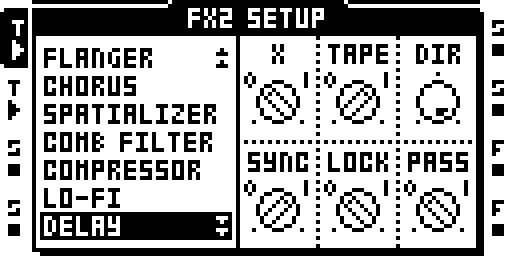
FX2 setup page with scene A held.
Scene locks and the crossfader for page 2 of FX1 and FX2. Stock scenes lock page 1 only; the page-2 knobs (slots 6–11) had no scene lock.
Operation
Open an FX1 or FX2 page 2, hold scene A or B and turn a knob on slots 6–11: the lock goes to the held scene. Hold FUNC while turning to remove the lock. With a scene held, the page-2 dials show that scene's lock, as the page-1 dials do.
- A scene holds eight page-2 locks across its tracks (128 a Part); a scene with all eight taken drops a turn that would add a ninth.
- Scene copy, paste, clear and undo carry the page-2 locks with the rest of the scene.
- With PLOCKS P2 in the remix and no scene held, held trigs show the first held step's page-2 lock on the dial.
- A knob press with a scene held toggles the page-1 lock of that knob (stock); page 2 uses FUNC+turn to remove a lock instead.
Notes
- Page-2 scene locks saved by an image before 10 Oct 2026 are not read by this one.
- Not run on a unit beyond being carried by image 88.
Status: on hardware: cursory testing on Sam's MKII (owner report, 16 Oct 2026); 26 Sep 2026.
Module facts (developers)
Scene locks and the crossfader on FX1/FX2 page 2 (hold a scene, turn a page-2 knob).
| Detail | Value |
|---|---|
| Author | sambanks |
| Category | Parts, Kits and scenes |
| Kind | cf_patch |
| Test status | on hardware: cursory testing on Sam's MKII (owner report, 16 Oct 2026); 26 Sep 2026 |
| Included in | octabam-bus, octabam-core, octabam-inserts |
On GitHub: https://github.com/sambanks/octabam/blob/main/modules/scenes-p2/README.md