Page 2 Parameter Locks
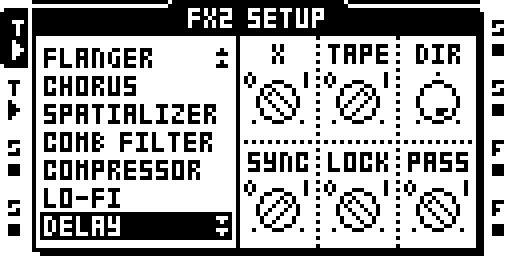
FX2 setup page with trig 1 held for parameter locking.
Use page 2 parameter locks to automate FX1 or FX2 parameters that are not available on stock page 1.
A step can carry locks for both FX pages.
Create and Remove a Lock
Open the FX1 or FX2 SETUP page, hold one or more trigs and turn a knob: each held step gets that slot's page-2 lock. Hold FUNC while turning to remove it. The trig plays the lock, and the next trig puts the Part's value back — the same as page 1.
The locks move with the data: trig copy and paste, clear a trig's locks, pattern copy and paste, clear a pattern and its undo each carry or clear them. SAVE PROJECT writes them and a power cycle loads them back.
Limits and Saving
- Page 2 has no slide: a slide trig moves page 1 only.
- A held step with no trig takes a page-2 lock that never plays.
- The power-off copy of the current bank holds 4,768 locks. A bank with more has no power-cut copy: a power cut loses its unsaved page-2 locks back to the last save.
Status: on hardware: cursory testing on Sam's MKII (owner report, 16 Oct 2026).
Module facts (developers)
Parameter locks on FX1/FX2 page 2 (hold trigs, turn a knob on the SETUP page).
| Detail | Value |
|---|---|
| Author | sambanks |
| Category | Machines and the sequencer |
| Kind | cf_patch |
| Test status | on hardware: cursory testing on Sam's MKII (owner report, 16 Oct 2026) |
| Requires | SCENES P2, STORE |
| Included in | octabam-bus, octabam-core, octabam-inserts |
On GitHub: https://github.com/sambanks/octabam/blob/main/modules/plocks-p2/README.md