TEMPO Window
By Sam Banks. In Octabam Bus.
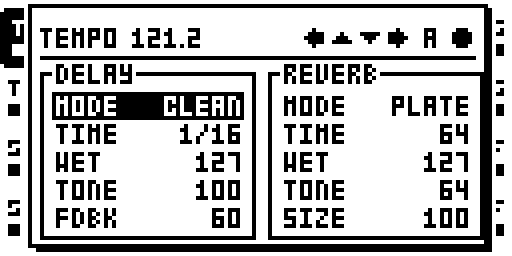
Delay and reverb controls in the TEMPO window.
In Octabam Bus, use the TEMPO window to view and edit the shared delay and reverb controls.
Controls
Press [TEMPO]: the window opens at the menu window's size, with two boxes, DELAY and REVERB, listing each engine's knobs with the values the host page would show.
| Control | Does |
|---|---|
| UP / DOWN | move the cursor a row in the focused box (the box scrolls, five rows visible) |
| A | edits the selected parameter on the host track (×7 while A is pushed is the stock fast turn) |
| B | the same as A |
| LEFT / RIGHT | focus DELAY / REVERB; each box keeps its own cursor |
| LEVEL | BPM in whole steps (×7 while LEVEL is pushed) |
| FUNC + LEVEL | BPM in 0.1 steps |
| scene A or B held + A or B | sets the held scene's lock on the selected parameter |
| scene A or B held + press A or B | removes the held scene's lock on the selected parameter |
| [TEMPO], [YES], [NO] | close |
Scene locks
Hold scene A or B and turn A or B to lock the selected delay or reverb parameter to that scene. The crossfader then moves the parameter between the two scenes' values, as it does for the knobs on the parameter pages. While the scene is held, the boxes show that scene's locks. Pressing and releasing A or B without turning removes the lock on the selected row. You can open the window before or after pressing the scene.
Page-2 parameters (MODE, TIME, TONE and the rest of slots 6–11) use the page-2 scene locks: a scene holds eight of them across all tracks.
The header prints the tempo as TEMPO 121.2, or PTN 121.2 while the
pattern tempo is on.
The delay's knobs and the reverb's knobs list what the boxes show.