Shatter
By ilia-murzinov. In Octabam and Octabam Verbs.
Chooser: FX2.
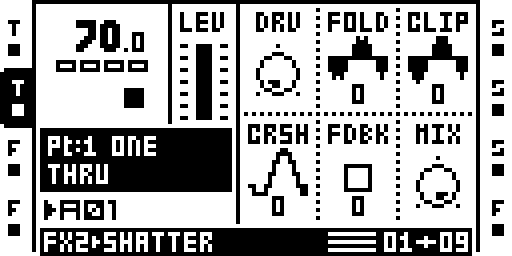
SHATTER: main parameter page.
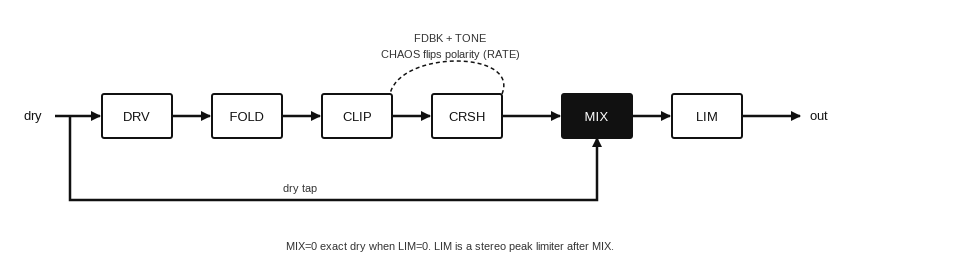
Crush insert. Drive into a wavefolder, hard/soft clip, then combined bit-depth + sample-rate crush, with a feedback loop and tone shelf. MODE CHAOS flips feedback polarity from a free-running ramp so the loop self-modulates into hash and dropouts. LIM is a stereo peak limiter after MIX. MIX 0 is exact dry when LIM is 0.
Access
Select a track, press [FX2] (or [FX1] when the remix lists it
there), pick SHATTER.
Operation
Start with MIX up and everything else at 0. Raise DRV into the folder, FOLD for folds, CLIP for the brick, CRSH for bit/SRR grit. FDBK recirculates the crush path. TONE shelves that loop. MODE CHAOS flips FDBK polarity at RATE. Raise LIM to catch the post-MIX peaks when the crush path is hot.
DRV and FOLD add drive before the dirt stages. SHATTER compensates DRV after the chain. FOLD uses partial compensation, so the folded signal keeps more level as you raise it. Quiet signals can get louder at high FOLD settings. Use MIX to balance the effect. CLIP, CRSH and FDBK also change the sound and its level. FDBK has a lower maximum loop gain. Raise LIM to catch peaks when the processed signal is hot. MODE/TONE/RATE are easiest with CLIP open and FDBK up.
Controls
Each effect has two pages of six knobs, A to F; the PAGE keys switch between them.
Page 1
| Knob | Name | Values | Default | What it does |
|---|---|---|---|---|
| A | DRV | 0 to 127 | 0 | dry-path drive; output gain compensated after the dirt chain; feedback stays undriven |
| B | FOLD | 0 to 127 | 0 | wavefolder; 0 is off; higher settings fold more with partial output gain compensation |
| C | CLIP | 0 to 127 | 0 | clip threshold: 0 is open, 127 is a brick wall |
| D | CRSH | 0 to 127 | 0 | bit-depth and sample-rate crush together |
| E | FDBK | 0 to 127 | 0 | feedback around the fold, clip and crush with a reduced maximum; CHAOS flips its polarity |
| F | MIX | 0 to 127 | 127 | dry/wet; 0 is exact passthrough when LIM is 0 |
Page 2
| Knob | Name | Values | Default | What it does |
|---|---|---|---|---|
| A | MODE | HARD / SOFT / CHAOS | HARD | HARD clip, SOFT (cubic) clip, or CHAOS (the feedback polarity flips) |
| B | TONE | 0 to 127 | 64 | shelf in the feedback loop: 0 dark, 127 bright |
| C | RATE | 0 to 127 | 64 | CHAOS: how fast the polarity flips; ignored in HARD and SOFT |
| D | LIM | 0 to 127 | 0 | stereo peak limiter after MIX; 0 off, 1..127 ceiling ~-2.5..-12 dB |
Screens
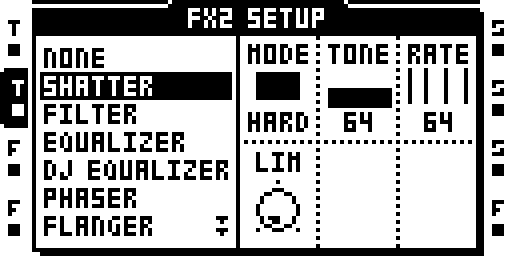
SHATTER: effect selection and setup parameters.