OCTA-303
By MaMarko. In all three remixes.
A circuit-modelled Roland TB-303 voice, one per track, as a machine of its own: OCTA-303. It needs no sample, gives up no stock effect, and its model is fitted to recordings of a real TB-303 (Din Sync's x0xb0x reference set).
Limit
A Part holds at most two OCTA-303 tracks (in an image that also carries WAVE, two machines of either kind). Choosing OCTA-303 for a third shows MAX 2 OCTA-303 (MAX 2 MACHINES beside WAVE) and the track
becomes plain FLEX, and a project that has more loses the extra machines when it loads (they become FLEX). Each playing machine takes a large share of the processor, and with more the panel stops
answering while the audio keeps playing.
Access
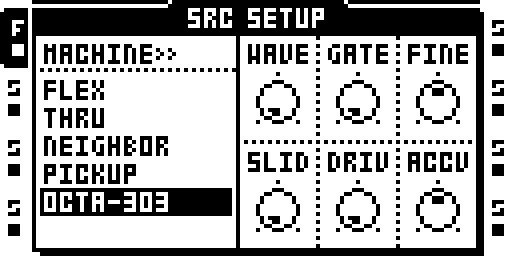
Double-tap the [TRACK] key to open the machine list, choose OCTA-303 (below PICKUP; in an image that also carries Analog BD, below ANALOG BD, and the list scrolls to it), [YES]. [FUNC] + [SRC] opens the same list; on a track with a sample it shows the sample list first, and [LEFT] reaches the machines. A new OCTA-303 track starts at TUNE C3, CUT RES ENV DEC 64, ACC 0.
Controls
| Page | Knob | What it does |
|---|---|---|
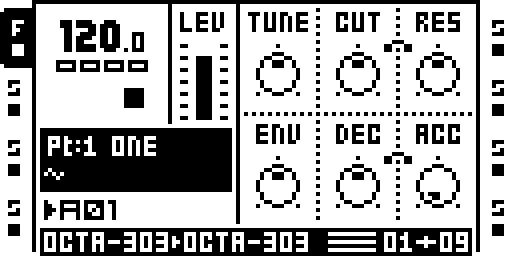
| SRC | TUNE | the note, C1–C5 by name |
| SRC | CUT | cutoff, the 303's CUTOFF FREQ law |
| SRC | RES | resonance |
| SRC | ENV | env mod |
| SRC | DEC | decay, ~0.13–2.4 s |
| SRC | ACC | the ACCENT knob, applied on the steps with an ACC lock |
| SETUP | WAVE | SAW, SQR, SAW+D, SQR+D (+D: a distortion pedal after the VCA) |
| SETUP | GATE | OFF: the AMP page shapes the note; 303: the 303's own gate, 3.5 of 6 clocks, tied into a slide |
| SETUP | FINE | fine tune, ±½ semitone |
| SETUP | SLID | slide time (0 = the 303's) |
| SETUP | DRIV | drive into the output's soft ceiling, up to +18 dB |
| SETUP | ACCV | accent loudness (64 = the calibrated 303) |
Playing it
- Accent: p-lock ACC on the steps to accent; the ACC knob sets how much.
- Slide: a trigless trig or a trigless lock ([FUNC] + [TRIG]) on the next step. The moment it is placed it takes the note it slides from as its TUNE lock (the previous step with a trig or a slide), so it ties into that note as on the TB-303; hold the step and turn TUNE to slide somewhere else. A step that already has a TUNE lock keeps it.
- Octave up / down (the TB-303's UP and DOWN): in GRID RECORDING, hold
one or more trigs and press [UP] or [DOWN]. Each held step's TUNE moves an
octave (a step without its own note starts from the track's TUNE); a note
past C1–C5 stays where it is. The screen shows the note, e.g.
C4 +OCT. On other tracks [TRIG] + [UP] / [DOWN] works as stock (the sample list). - LFOs: LFO SETUP lists the destinations by OCTA-303's names (TUNE, CUT, RES, ENV, DEC, ACC).
- The chromatic keys play semitones. AMP, FX1, FX2, LFOs, scenes and p-locks work as on any track.
- Beside SCALE QUANTIZER, an OCTA-303 track's chromatic keys stay semitones; every other track's follow the scale as usual.