Copy Project
By ilia-murzinov. In all three remixes.
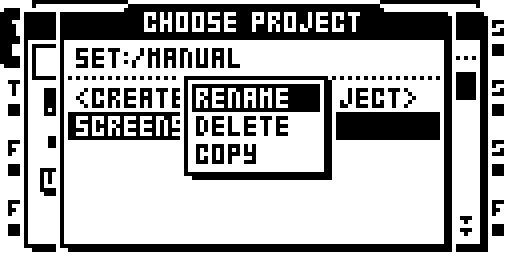
FUNC+BANK: RENAME / DELETE / COPY.
Duplicate a project folder on the CompactFlash card without loading it
first. The copy has everything in the folder: the stock files and what the
added features keep there (Kits, scenes, page 2 locks, BRAIN settings).
SAVE TO NEW copies them too: the files of the old folder that the new
folder does not have, as they are on the card. The .strd saved copies
are not carried over; SAVE PROJECT writes them for the new project.
Access
MAIN MENU → PROJECT → CHANGE → highlight a project → [FUNC] + [BANK]
→ COPY (under RENAME / DELETE). Mount the set that holds the source
first (CHANGE set if needed). Unavailable on <CREATE EMPTY PROJECT>.
Operation
- Open the CHANGE project list and highlight the source.
[FUNC]+[BANK]→ COPY.- Edit the suggested name (
PROJECT+ date). The name editor caps at 32 characters. - Confirm
"COPY SRC -> DST?". - On success:
"PROJECT COPIED"/"OPEN IT?".[YES]loads the copy and closes CHOOSE PROJECT.[NO]leaves the live project as it was."COPY FAILED"on error. A partial destination folder is removed.
Disk only. What SAVE is for
COPY copies the folder on the card, not what is in memory. Stock already saves banks as you edit, so most trig edits are on the card without an explicit SAVE. OPEN IT? does not ask to save the live project.
Copying works within the mounted set only. It refuses (rather than cut anything short) when the set has more than 64 projects, a folder has more than 256 entries, or a name inside the project is longer than 32 characters.
Screens
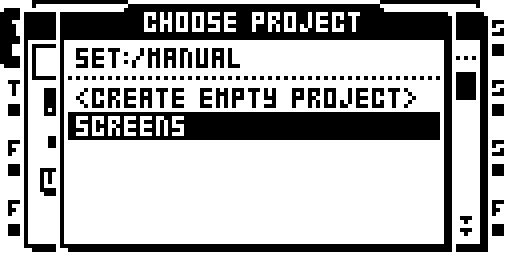
CHANGE project list (source selected).
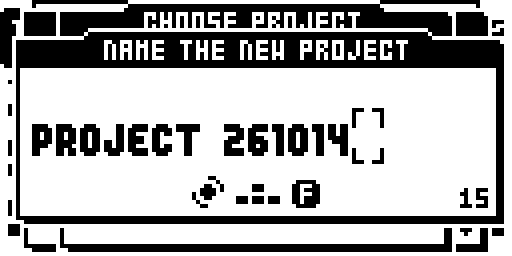
NAME THE NEW PROJECT (stock PROJECT+date; FUNC+CUE with RND NAME).
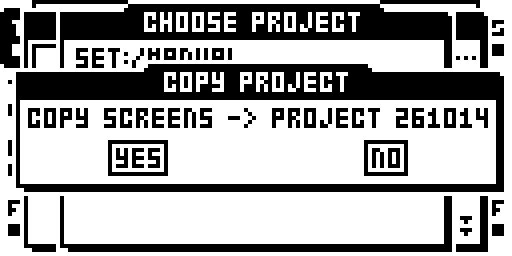
Confirm COPY source -> destination.
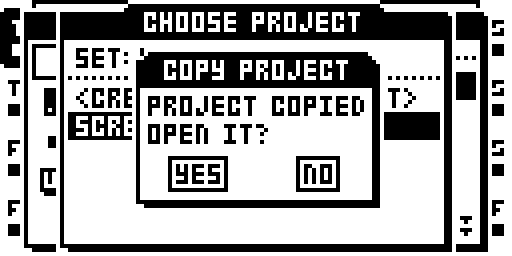
After copy: PROJECT COPIED / OPEN IT?