Page 2 Scene Locks
By Sam Banks. In all three remixes.
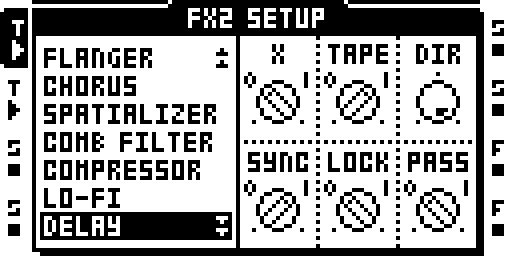
FX2 setup page with scene A held.
Scene locks and the crossfader for page 2 of FX1 and FX2. Stock scenes lock page 1 only; the page-2 knobs (slots 6–11) had no scene lock.
Operation
Open an FX1 or FX2 page 2 (its SETUP window: press FX1 or FX2 twice), hold scene A or B and turn a knob on slots 6–11: the lock goes to the held scene. Hold FUNC while turning to remove the lock. With a scene held, the page-2 dials show that scene's lock, as the page-1 dials do.
- A scene holds eight page-2 locks across its tracks (128 a Part); a scene with all eight taken drops a turn that would add a ninth.
- Scene copy, paste, clear and undo carry the page-2 locks with the rest of the scene.
- With PLOCKS P2 in the remix and no scene held, held trigs show the first held step's page-2 lock on the dial.
- A knob press with a scene held toggles the page-1 lock of that knob (stock); page 2 uses FUNC+turn to remove a lock instead.