Buffer Saver
By Chupitnik. In all three remixes.
What it does
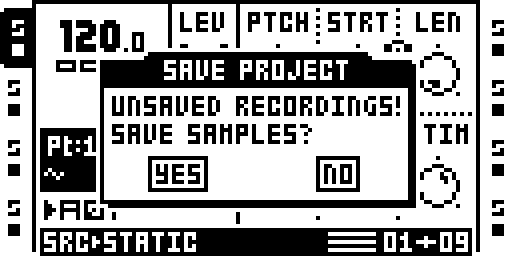
Saving a project does not save what you recorded into the recorder buffers. Forget SAVE THIS RECORDING, switch off, and the project comes back without its sounds. BUFFER SAVER makes SAVE PROJECT offer to save them, so the takes come back with the project.
How to use it
Record as usual, then save the project: PROJECT > SAVE, [FUNC] + [PROJ], or PROJECT > SAVE TO NEW. If a recorder buffer holds a take you have not saved yet, a question comes up first:
- [YES]: each new take is saved to the card and assigned back to its own recorder buffer, then the project saves as usual (the usual SAVE PROJECT question follows). Load the project again and the takes are there.
- [NO]: the project saves exactly as it always did.
-
With SAVE TO NEW, [YES] saves the takes first; the new project then gets them too.
-
No naming screen: each take gets the Octatrack's own suggested name,
R1-YYMMDD-HHMM(R1 to R8 = the buffer). If that name is taken,-2,-3… is added, so nothing is ever overwritten. - The files go where PERSONALIZE's SAVE SAMPLES TO says, each with its
.otsettings file, as SAVE THIS RECORDING would write them. - With nothing new to save, SAVE PROJECT is unchanged and asks nothing. A take saved once is not offered again until that buffer records again.
- A buffer still recording is left for the next save.
Screens