Rec Threshold
By Chupitnik. In all three remixes.
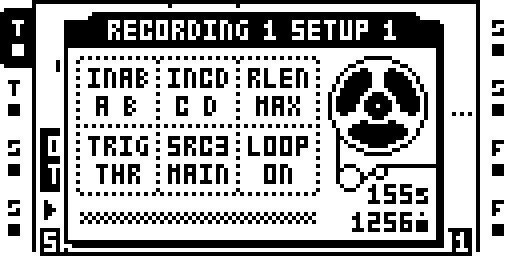
TRIG set to THR in RECORDING SETUP 1.
A recorder TRIG mode that waits for the input: arm the recorder, and the take starts by itself when the input gets louder than the track's threshold, as on the Digitakt 2.
Access
- Hold FUNC and press REC AB (RECORDING SETUP 1). Turn TRIG past ONE, ONE2 and HOLD to THR.
- Hold FUNC and press REC CD (RECORDING SETUP 2). On a THR track two cells change: QREC becomes LEV and QPL becomes IN.
- Play the source, read IN, and set LEV a few dB below it.
- Arm: hold TRACK and press REC (or REC alone for the active track). While it waits, the track's status icon at the screen edge blinks.
REC THRESHOLD and REC TRIG MUTE both change the same part of the stock firmware; HOOKS (see Behind the scenes) lets them share it.
Operation
- LEV is the threshold: -60 to -8 dB in 4 dB steps, then -6, -4, -2 and 0 dB. It is saved with the Part, per track. Setting TRIG to THR sets -40 if it was never set.
- IN is the live input level in dB: the loudest of inputs A-D, held about
0.5 s, then falling about 29 dB/s;
---below -60. Its knob does nothing. - The take starts when the input reaches LEV (at or over, so 0 dB can fire) and ends at RLEN as usual; with RLEN MAX, a press stops it. Arm again for the next one.
- The start is immediate; QREC is not applied, so a start quantised to the next beat cannot cut off the attack the threshold caught.
- A second press while armed cancels. A press while recording stops the take.
- An arm is dropped without a take if the track's TRIG is no longer THR, or if the recorder is already recording when the input arrives.
- With GRID RECORDING on, stock's REC keys do nothing inside RECORDING SETUP; arm outside it.
- On a track not set to THR, RECORDING SETUP 2 shows QREC and QPL and both edit as stock.
- A Part saved with THR loads on stock 1.40C as TRIG HOLD, with its LEV as a QREC value.
Screens
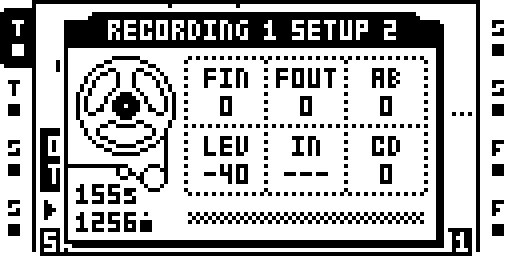
Threshold LEV and live IN meter in RECORDING SETUP 2.