Morph
By MaMarko. In all three remixes.
A track's scene morph, played by itself. The track moves from scene A to scene B and back on its own, in time with the pattern, while the other tracks keep the crossfader. Each track has its own cycle length and mode, and several can morph at once. Once set up, a track key held for a second turns a track's morph on and off, also on the MIXER page. Inspired by the Korg Electribe's Motion Sequence.
Access
Hold a TRACK key and press UP: the MORPH window opens for the held tracks. Turn A, B and C to set them; the window stays open when you let go. YES closes it and the morph starts from scene A on the next step; NO closes it and nothing starts. Either way the tracks are armed: hold a TRACK key alone for about a second to start its morph, and again to stop it. It saves through STORE.
Operation
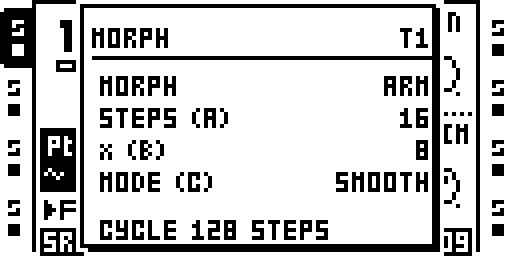
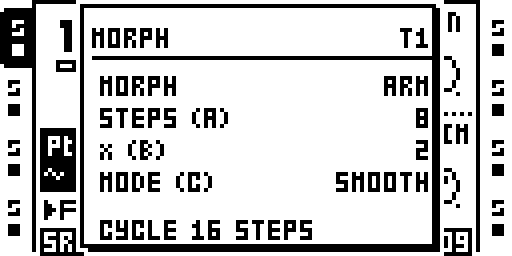
- The morph runs A → B → A once every STEPS × x steps (16 × 8 = 128 by default, at most 64 × 100). It counts the sequencer's steps, so it never drifts from the pattern.
- TRACK held about a second, alone, on an armed track: a track that is not morphing starts from A on the next step (toast T2 MORPH ON); a morphing one finishes its cycle on A and stops there (T2 MORPH OFF). It works on the MIXER page too, where the trig keys mute the tracks.
- TRACK + UP on a track that is already morphing opens the window over it: changes apply at once and the morph goes on.
- TRACK + DOWN lets the cycle finish on scene A, then the track stays parked on A. It follows the crossfader again once the crossfader reaches its A end, so nothing jumps.
- The way back (v1.2), on D, E and F. RET sets how long B → A takes: SAME (as long as the way up), 1/2, 1/4, 1/8 or 1/16 of the way up, BAR, BEAT, STEP, or CUT (straight back to A). CURV shapes it: HAND makes the way back fast at first and soft at the end, as a hand pulls a fader; RISE makes the way up slow at first and fast at the end; BOTH does both. END: LOOP again and again, ONCE one cycle and then parked on A, or STAY: up to B and held there (TOP) until you hold the TRACK key about a second or press TRACK + DOWN; then it comes back over RET and parks on A. Made for risers. SAME, LIN and LOOP are the old behaviour exactly.
- The way up is always half of STEPS × x; a shorter RET makes the cycle shorter (16 × 8 with RET 1/4: 64 steps up, 16 back).
- STOP holds the morph where it is; PLAY carries on.
- The settings of every track, which tracks morph and which are armed are saved with the project (SAVE PROJECT keeps a copy that RELOAD brings back). After a project load or a power-up, the tracks that were morphing start from A on the first step after PLAY.
- MIDI tracks keep the crossfader. Select parameters jump at the middle of the morph, as with the crossfader.
Controls
| Control | Does |
|---|---|
| TRACK + UP | open the window for the held tracks |
| YES (in the window) | close; the tracks start on the next step |
| NO, UP (in the window) | close; nothing starts (the tracks stay armed) |
| TRACK held ~1 s | an armed track's morph on / off; on B with STAY: back to A |
| TRACK + DOWN | finish the cycle on A and park there; on B with STAY: back to A |
| A | STEPS: TRK (the track's length) or 1..64 |
| B | x: 1..100 |
| C | MODE: SMOOTH (moves every frame) or HOLD (one value a step) |
| D | RET: SAME, 1/2, 1/4, 1/8, 1/16, BAR, BEAT, STEP, CUT |
| E | CURV: LIN, HAND, RISE, BOTH |
| F | END: LOOP, ONCE, STAY |
| DOWN (in the window) | stop, as TRACK + DOWN |
The title row shows the window's tracks and, on the right, ARM (in the window), WAIT (starting on the next step), ON, STOP (finishing on A), PARK, TOP (held on B) or RET (on the way back). The row under it shows the cycle (CYCLE 128), the step while the morph runs (STEP 12/128) or on the way back after STAY (BACK 2/4), and on the right the two scenes with the morph's position between them, as the main page's footer shows the crossfader's.