MIDI Scenes
By bkkbrls-del, from midisc. In all three remixes.
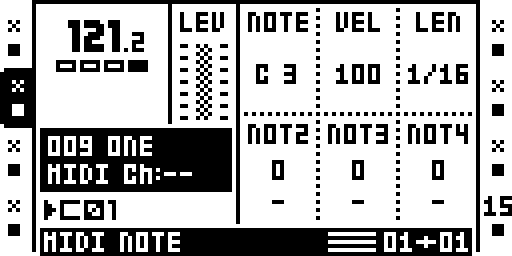
MIDI track NOTE page while scene A is held.
Scene locks for the eight MIDI tracks, as stock has for the audio tracks. Each scene can lock any knob of a MIDI track's pages (NOTE, LFO, ARP, CTRL1, CTRL2), and the crossfader mixes scene A and B for them.
Operation
In MIDI mode (MIDI SEQUENCER), with scene A or B held:
- Turn a knob: the lock goes to the held scene for the displayed track.
- The knob readout shows that scene's lock while the scene is held.
- Press the knob's encoder: that knob's lock is cleared.
- The lock LEDs and grey cells show the MIDI locks; a scene pad lights when its scene holds a lock for any track.
- Move the crossfader (the panel's or CC 48): each locked parameter goes A↔B, and CCs are sent when a value changes.
- When no scene on either side of the crossfader locks a CC any more, it returns to the Part's value and that value is sent. (MIDISC 2.1 left the last locked value in place; this is a change in octabam.)
CLEAR, COPY and PASTE SCENE act on the whole scene, its MIDI locks and its audio locks together, whether the audio or the MIDI tracks are shown. The locks themselves stay separate: a MIDI lock never moves an audio track, and the reverse.
Notes
- A track's locks affect that track only.
- The locks are saved with the project; SAVE PROJECT writes them, and the current bank's copy survives a power-off.
- A Kit does not carry a Part's MIDI locks.
- Page 2 of FX1 and FX2 has its own scene locks (SCENES P2).
- Holding a scene while pressing MIDI shows that scene's locks for the tracks you switch to, as if you had pressed the scene there (stock does not show them when you switch from the MIDI to the audio tracks).