Recorder Trig Mute
By Zac Kyoti. In all three remixes.
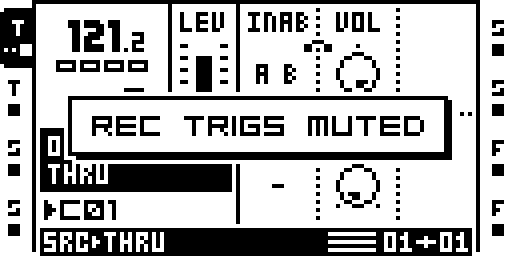
Recorder trigs muted on track 1.
Mutes a track's recorder trigs without deleting them.
Operation
Hold [TRACK] and press [REC]: that track's recorder trigs stop firing
— a recording already running finishes — and a toast reads
REC TRIGS MUTED. Press it again to bring them back
(REC TRIGS UNMUTED).
- Each track keeps its own state. With several track keys held, each
one flips; the toast reads
REC TRIGS TOGGLEDwhen they end up mixed. - The toast stays up while you hold the track key, up to 1 second, and closes when you let go.
- While a track key is held, [REC] does not switch grid recording. On its own, [REC] works as on stock.
- Works on any screen.
- Holds across pattern changes until you unmute.
- Every track starts unmuted at power-on.
- A muted track's tab at the screen edge shows two dots, one above the other, beside its machine letter on the inner side: right of the letter on tracks 1–4, left of it on tracks 5–8. The play/stop icon below stays as on stock.
- MIDI CC 80 on a track's channel: 0 unmutes, 1–127 mutes (AUTO channel = the active track), with AUDIO CC IN on. The keys send CC 80 on each held track's channel (1 muted, 0 unmuted), with AUDIO CC OUT on.
- [TRACK] + [YES] / [NO] and [FUNC] + [YES] / [NO] arm and disarm one-shot trigs as on stock.