Sidechain Compressor
By Zac Kyoti. In Octabam and Octabam Verbs.
Chooser: FX1 and FX2, in place of COMPRESSOR.
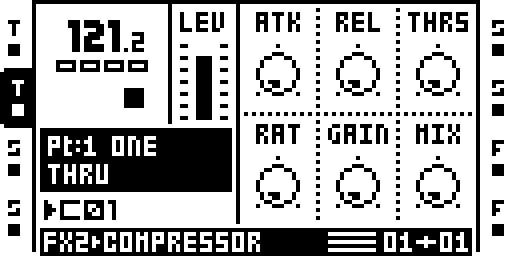
SIDECHAIN_COMPRESSOR: main parameter page.
The stock COMPRESSOR with a side-chain and a base-width key filter: any of tracks 1-8 can drive its detector, so one track's level ducks another. Page 2 adds a switch to listen to the key, the key itself, its gain, and a high-pass and low-pass pair that sets the band the detector hears.
The base-width filter isolates the key: a kick's fundamental, for example, with the high-pass cutting the sub-sonic rumble below it. That reduces distortion and keeps the compression smooth at short attack and release settings.
Access
An effect on a track: select the track, press FX2 (or FX1), and pick COMPRESSOR from the chooser; the setup page shows the new knobs. There is no separate effect to load: COMPRESSOR is the side-chain compressor.
The side-chain is loaded into the audio processor while a track uses COMPRESSOR. Until it
arrives, just after you choose COMPRESSOR, COMPRESSOR works as stock, KEY reads -- and the screen
says SC KEY OFF. In Octabam the same happens while DARK REV on track 4's FX2, or another loaded
effect, holds the memory the side-chain uses. It is not in Octabam Bus.
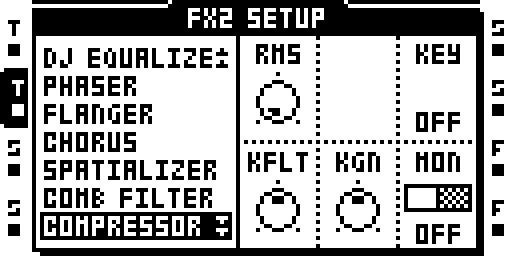
FX2 SETUP with COMPRESSOR selected, showing RMS, MON, KEY (here T2), KGN, KBAS and KWID.
Operation
- KEY chooses what drives the detector: OFF (the track's own signal, as
stock) or T1-T8. In the loader form, KEY reads
--while the side-chain is not loaded (just after you pick COMPRESSOR, or while a reverb holds its block: theSC KEY OFFmessage). COMPRESSOR then works as stock; your KEY setting is kept and comes back when the side-chain does. It is drawn as a nine-position switch, OFF pointing left and T8 right, and moves one position per detent, also with the encoder pressed. Choosing the compressor's own track keys it from its own signal through the filter. - KBAS is the filter's base: a high-pass at OFF or 20 Hz to 19.6 kHz. Its
readout is in Hz (
1.2kis 1.2 kHz). - KWID is the filter's width (the bracket between KBAS and KWID shows the pair): a low-pass this many octaves above KBAS, 0.5 to 9.9, or OFF. Its readout is in octaves. With KBAS at OFF it counts up from 20 Hz, so it works as a plain low-pass.
- The two cannot cross: raising KBAS moves the whole band up.
- For a kick: KBAS about 30-40 Hz, KWID about 1.2-1.5.
- KGN is the key's gain, about -24 to +24 dB.
- MON lets you hear the processed key in place of the track: OFF on the left, ON on the right. Switching it, or changing KEY while it is on, fades (about 6 ms) instead of clicking.
- A key from an earlier track in the same group of four (T1 keying T2-T4, T5 keying T6-T8) reaches the detector with no delay, so a trig on both tracks at once clicks less at short attack than a key from the other group.
- A COMPRESSOR saved on stock firmware comes up with MON OFF, KEY OFF, KGN centred and both filters OFF; one saved with an earlier version of this module comes up with MON OFF.
- Any track can key any other, in either group of four.
- With mute modes, a muted key track keeps feeding the key, as a stock mute does.
Controls
Each effect has two pages of six knobs, A to F; the PAGE keys switch between them.
Page 2
| Knob | Name | Values | Default | What it does |
|---|---|---|---|---|
| B | MON | OFF / ON / OFF / ON | OFF | ON: this track plays its processed key instead (audition) |
| C | KEY | OFF to T8 | OFF | the track whose audio drives the detector; OFF = stock (self) |
| D | KGN | 0 to 127 | 64 | the key's gain, about -24..+24 dB; 64 = unity |
| E | KBAS | 0 to 127 | 0 | the key's high-pass, 18 dB/oct: OFF, then 20 Hz to 19.6 kHz |
| F | KWID | 0 to 127 | 127 | the key's low-pass, 12 dB/oct: 0.5-9.9 octaves above KBAS (20 Hz if OFF), then OFF |
Screens
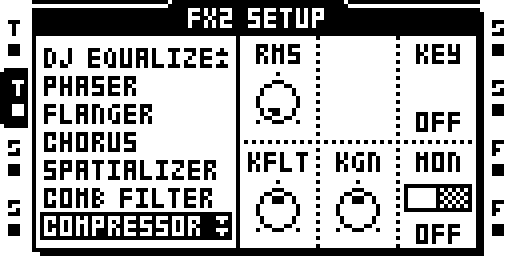
SIDECHAIN_COMPRESSOR: effect selection and setup parameters.