SEQ
By ilia-murzinov. In all three remixes.
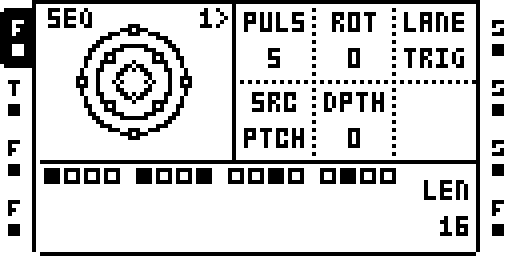
Use SEQ to fill an audio or MIDI track's pattern with a Euclidean rhythm, add parameter locks on their own rhythms, and generate melodies or MIDI chords. On TRIG, a fill writes sample or note trigs and the selected destination's locks together. On PLCK, it rewrites only that destination and leaves the track trigs alone.
PULS sets the hit count, ROT shifts the hits, and DPTH controls
how far locks vary from the Part value. Press [YES] to write the
preview. Each destination keeps its own PLCK rhythm, so its locks can land
independently of the track trigs. SEQ settings save with the project and
bank; audio and MIDI tracks keep separate settings. Hold [TRACK] and
press [PAGE] to open SEQ for that track.
Fresh audio-track settings start on SRC / PTCH. Fresh MIDI-track settings start on NOTE.
Mental model
Each track has one TRIG rhythm and a separate PLCK rhythm for each destination.
Audio sample trigs play the machine. MIDI note trigs send notes. Each destination's PLCK rhythm controls which steps write its locks. These rhythms can line up or land on different steps.
Choose TRIG to fill the sample or note rhythm. Choose PLCK to fill one destination's rhythm. A TRIG fill also writes locks for the selected destination; a PLCK fill rewrites only that destination. Other destinations keep their locks.
The grid previews SEQ's current settings; it does not show the pattern's
existing trigs. Opening SEQ or switching tracks loads saved settings but
does not read live trigs. Press [YES] to write the preview to the
pattern.
Open and leave
| Gesture | Result |
|---|---|
[TRACK] + [PAGE] |
Open SEQ on that track |
[NO] |
Close the window |
Bare [PAGE] |
Stock pattern pages / step banks; SEQ stays open |
Another [TRACK] while open |
Switch SEQ to that track |
Double-tap [TRACK] |
Stock QUICK ASSIGN on audio tracks; stock behavior on MIDI tracks |
[FUNC] + [TRACK] |
Stock mute |
[TRACK] + [PLAY] / [STOP] / [BANK] |
Stock preview / stop / audio editor |
[CUE] + [TRACK] |
Stock cue that track |
Bare [CUE] (tap) |
Random PULS hits on the focused lane |
[FUNC] + [BANK] |
Open the clear menu |
Lanes
On each track SEQ keeps:
- One TRIG lane. Where audio sample trigs or MIDI note trigs land.
- One PLCK lane per destination. Knob D picks the destination (AMP / VOL, SRC / PTCH, or a MIDI parameter). That destination keeps its own PULS, ROT, DPTH, and random step selection on the track.
LANE (C) chooses which lane A / B and the step grid edit. Scroll D on PLCK to load that destination's PULS / ROT into A / B.
| LANE | What you edit | What [YES] does |
|---|---|---|
| TRIG | Sample-trig or note-trig rhythm | Rewrites the track trigs. Places or clears locks for only the current destination on those steps. Copies that destination's PLCK PULS / ROT to match. |
| PLCK | That destination's lock rhythm | Leaves track trigs alone. Rewrites only this destination. Misses clear it even on steps with a sample or note trig. |
On audio tracks, a PLCK hit without a sample trig creates a trigless trig. It can trigger LFOs and FX envelopes without playing a sample. On MIDI tracks, PLCK leaves the note-trig rhythm alone and writes the selected MIDI lock on its hit steps. It does not add note trigs.
D / E stay live on [YES] even when LANE is TRIG.
Controls
SEQ has two control pages. [RIGHT] opens Harmony when D is set to
audio SRC / PTCH or MIDI NOTE. [LEFT] returns to Rhythm.
The step grid and LEN stay visible on both pages.
Rhythm
| Knob | Label | Role |
|---|---|---|
| A | PULS | Hit count of the focused lane |
| B | ROT | Rotation of the focused lane |
| C | LANE | TRIG or PLCK |
| D | Page and parameter | Choose the lock destination. Audio choices include AMP / VOL, SRC / PTCH, and CX OSC controls. MIDI choices include NOTE, VEL, LEN, LFO and ARP parameters, pitch bend, channel pressure, and CC1 through CC10. |
| E | DPTH | Set lock variation. At 0, the fill clears this destination's locks. AMP / VOL varies only below the Part value; audio PTCH and MIDI NOTE use DPTH for their pitch span. Other destinations vary above and below their Part values. |
| F | Empty |
LEN shows the active pattern length.
Tap [CUE] and release without [TRACK] to keep the PULS hit
count and choose its steps randomly on the focused lane. Changing PULS
returns to the Euclidean pattern.
Harmony
Audio tracks
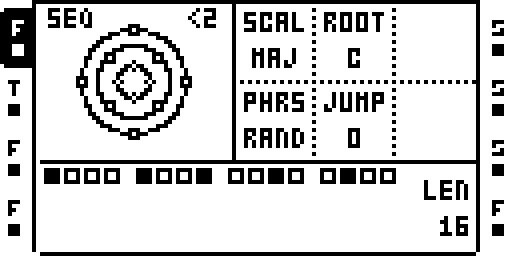
On audio tracks, Harmony controls the SRC / PTCH destination. SCAL and ROOT set the scale for generated pitch locks. DPTH sets their pitch span around the Part's PLAYBACK PTCH. D PHRS chooses RAND, UP, DOWN, ALT or TRI for the generated pitches. New tracks start at RAND. E JUMP sets the spacing between successive phrase positions from 0 to 127: 0 advances by one scale position; higher values skip farther. UP and DOWN start at the Part pitch and move in the selected direction, wrapping within the DPTH pitch span. ALT and TRI traverse that span from its lowest pitch. Sample playback pitch locks use whole-semitone steps. At DPTH 127, sample playback spans up to 12 semitones in either direction; synth and CX pitch span up to 24.
On audio tracks, C and F are blank.
MIDI tracks
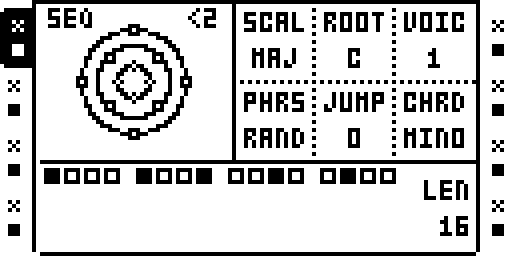
On MIDI tracks, A SCAL chooses MAJ, MIN, PENT, DOR, PHR, MIX, WHOL or CHRO. B ROOT chooses C through B. C VOIC chooses one to four notes. For NOTE fills, D PHRS chooses RAND, UP, DOWN, ALT or TRI. New tracks start at RAND. E JUMP ranges from 0 to 127 and sets spacing between successive phrase positions: 0 advances one scale position, and higher values skip farther. UP and DOWN start at the Part's NOTE and wrap through the in-scale notes inside the DPTH span. ALT and TRI traverse those notes from the low end. F CHRD chooses a chord shape and inversion. JUMP is not used for MIDI ARP destinations.
PHRS sets the pitch order on audio and MIDI tracks:
| PHRS | Pitch order |
|---|---|
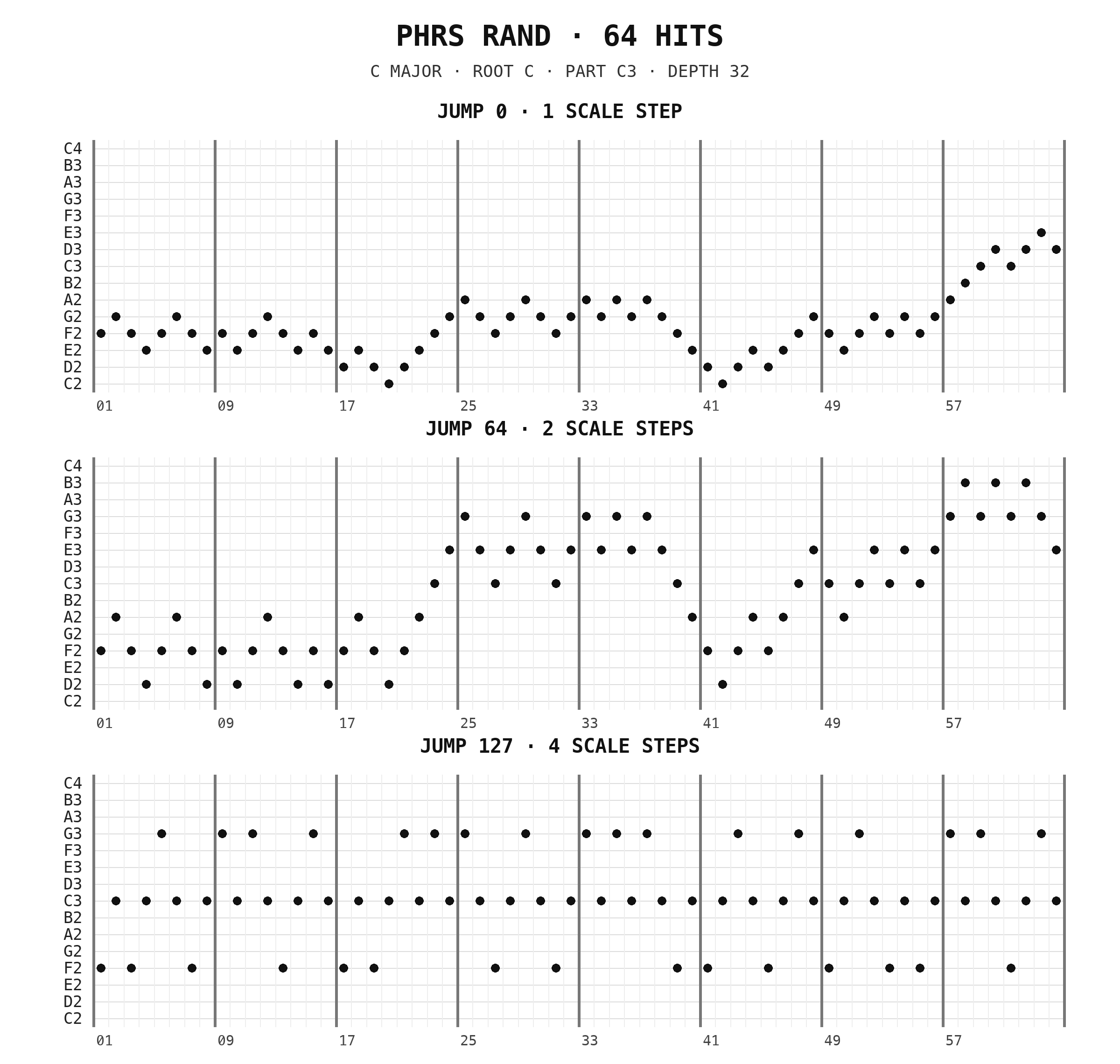
| RAND | Choose a random direction for each move through the in-scale pitches. JUMP sets the scale-degree distance between neighboring hits. At a DPTH edge, the walk turns around so the interval stays the same. This is the default. Filling again rerolls the sequence without changing the controls. |
| UP | Start at the Part pitch and move upward through the in-scale pitches. Wrap to the bottom of the DPTH span. |
| DOWN | Start at the Part pitch and move downward through the in-scale pitches. Wrap to the top of the DPTH span. |
| ALT | Rise from the lowest pitch to the highest, then descend without repeating the peak. |
| TRI | Rise from the lowest pitch, repeat the highest pitch once, then descend. |
For MIDI NOTE fills, DPTH sets the pitch span around the Part's NOTE. At DPTH 127, the span reaches up to four octaves in either direction, limited by the MIDI note range. MIDI ARP uses its selected mode's intervals rather than the melodic DPTH span.
Phrase types
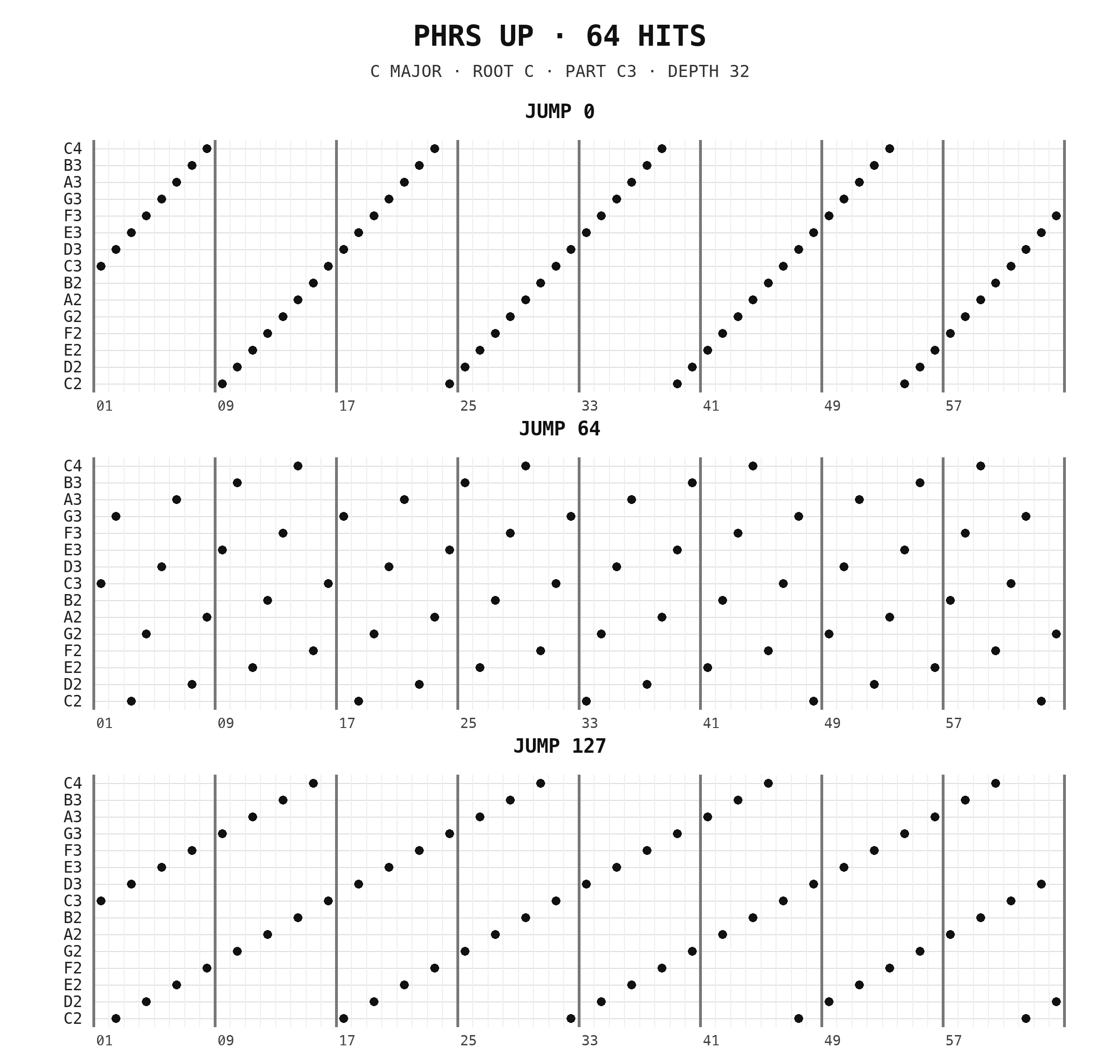
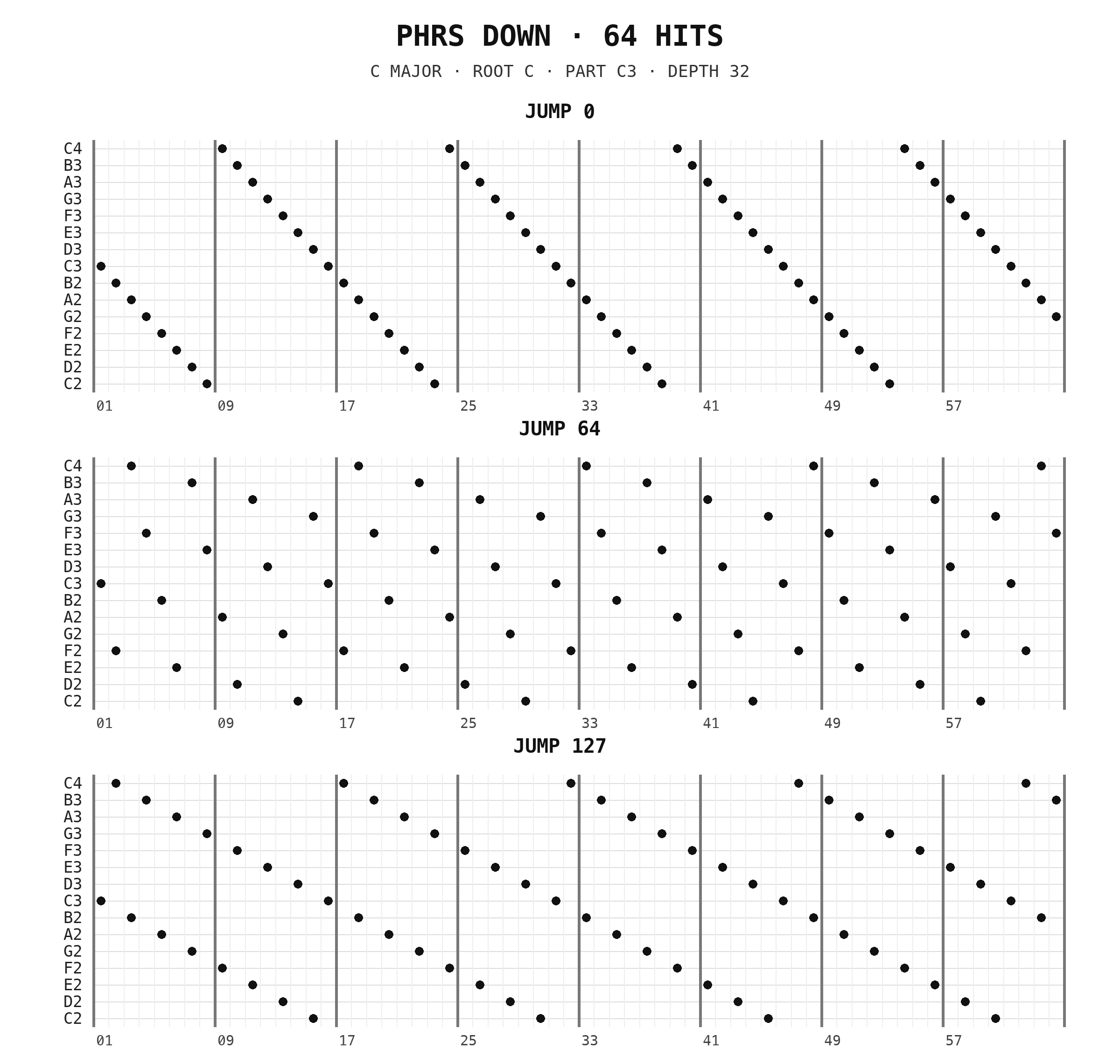
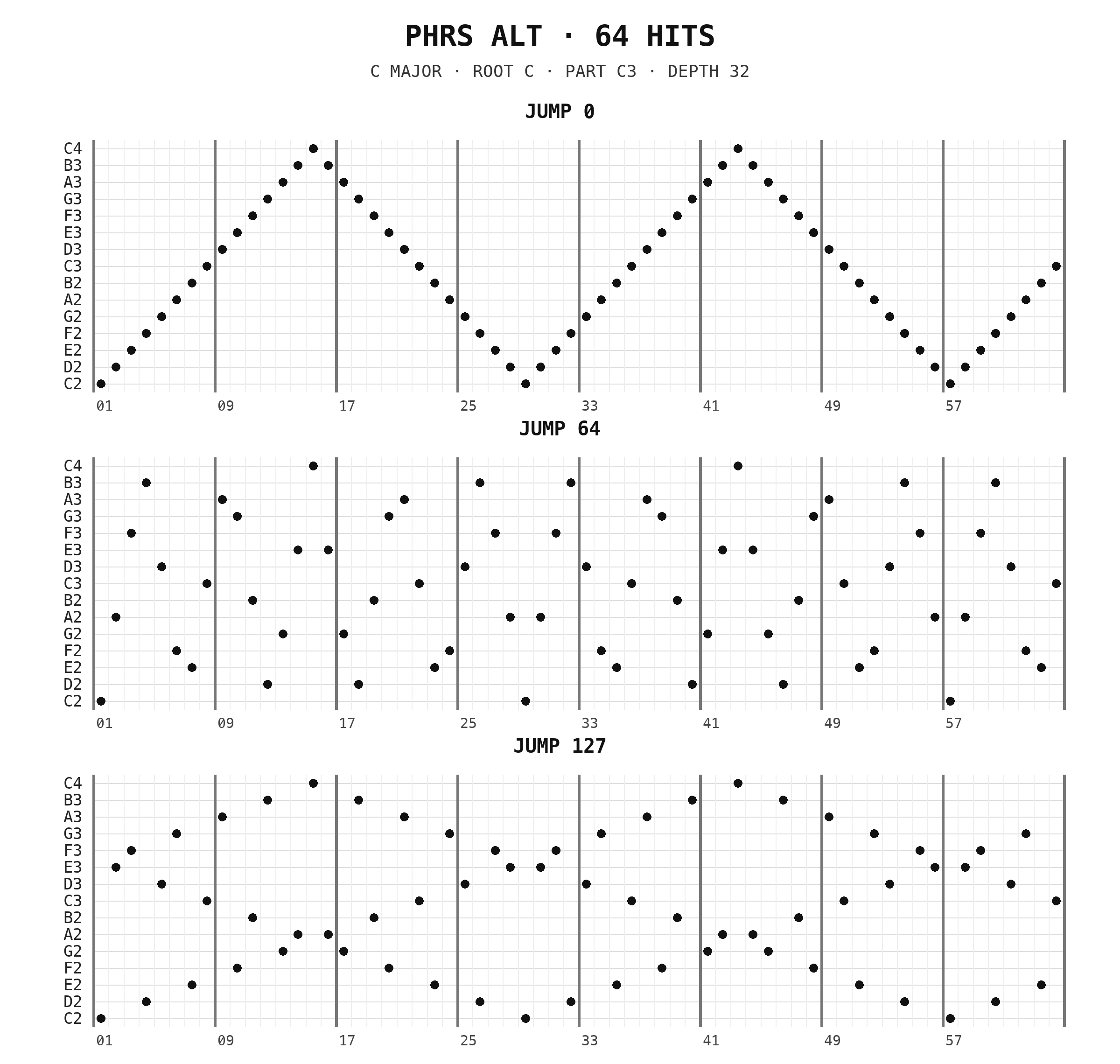
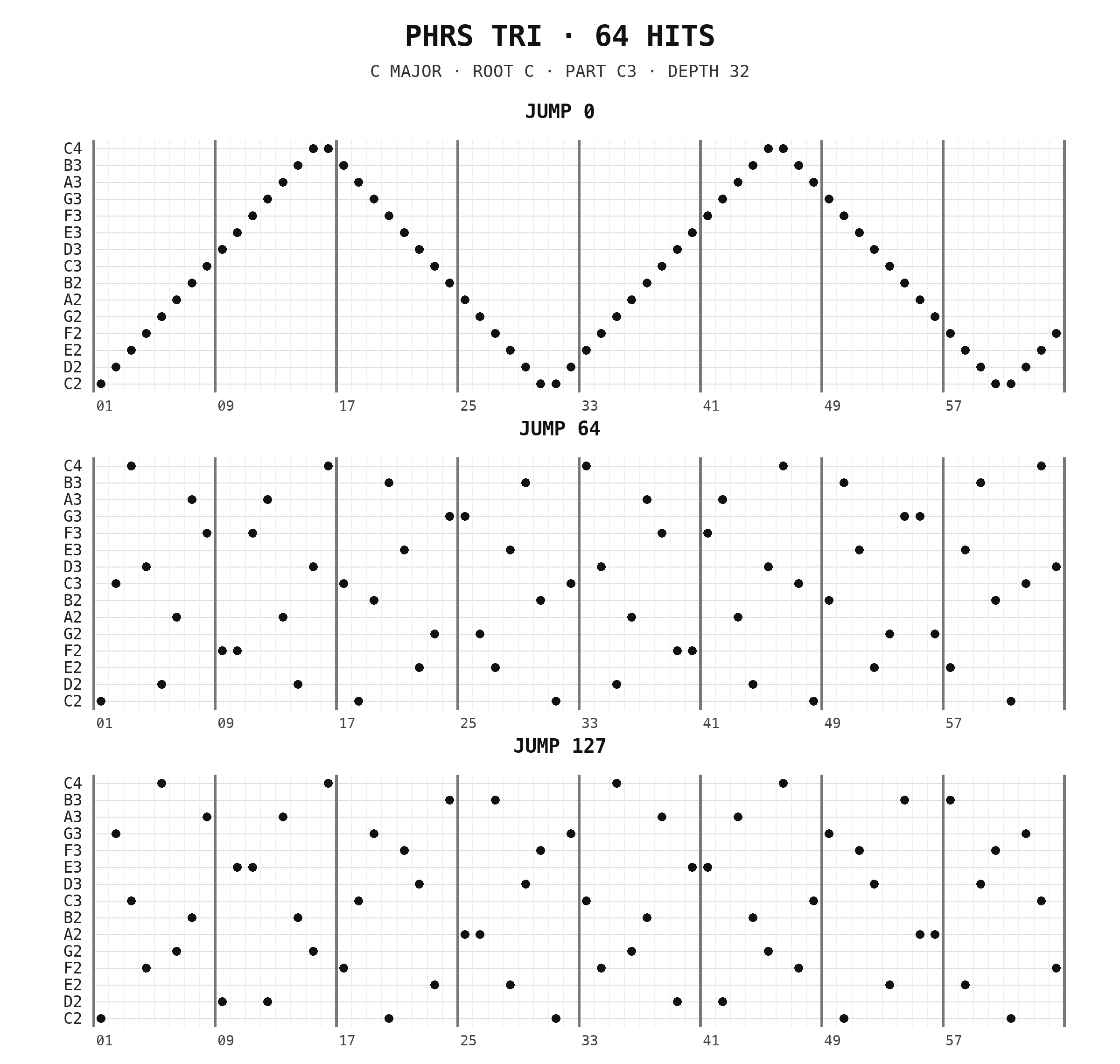
Each piano roll shows 64 MIDI NOTE hits in C major, ROOT C, with Part NOTE C3 and DPTH 32. The pitch range is C2–C4. The JUMP 0, 64 and 127 rolls use identical settings except for JUMP. Each roll uses the same seed so the random directions are comparable; JUMP changes the scale-degree distance while the notes stay within the same pitch range.
RAND
RAND chooses a starting in-scale pitch, then moves a random direction by the scale-degree distance set by JUMP. At either DPTH edge, it turns around instead of wrapping, so the absolute interval stays consistent; refilling chooses a new starting pitch and direction sequence.
UP
UP starts at C3 and climbs through the in-scale pitches. It wraps to the bottom of the C2–C4 span; raising JUMP skips farther between notes.
DOWN
DOWN starts at C3 and descends through the in-scale pitches. It wraps to the top of the span; raising JUMP skips farther between notes.
ALT
ALT starts at the bottom of the pitch set, rises to its highest note once, then descends without repeating the peak. At JUMP 0, its top notes are C4, B3.
TRI
TRI also starts at the bottom, but repeats the highest note once before descending. At JUMP 0, its top notes are C4, C4, B3. This single extra top hit is the only difference at JUMP 0. At JUMP 64, ALT uses a five-step stride and TRI a seven-step stride, so their rolls diverge more.
SEQ's SCAL and ROOT are independent of the PROJECT SCALE QUANTIZER on both audio and MIDI tracks.
Writing the pattern
Opening SEQ or switching tracks loads that track's saved settings. The grid
previews those settings; it does not show existing pattern trigs. Press
[YES] to write the preview to the pattern.
Each fill writes lock values from the current Part. Changing the Part later leaves written locks unchanged; fill again to use the new Part values.
[YES] overwrites from PULS / ROT, or from the random step
selection made with [CUE].
TRIG lane, sample trigs already present. Changing PULS / ROT /
[CUE] opens "ARE YOU SURE?" with
"EXISTING TRIGS IN THE PATTERN" /
"WILL BE CLEARED ON NEXT FILL". Dialog [YES] only unlocks the
knobs. Press [YES] again to write the pattern.
TRIG lane, note trigs already present. Changing PULS / ROT /
[CUE] opens the same dialog. The first [YES] applies the pending
change to the preview and unlocks editing. Press [YES] again to write.
[NO] cancels the pending change.
[CUE] tap (release with no [TRACK]). Keeps PULS as the hit
count and picks which steps are on at random on the focused lane.
[CUE] + [TRACK] is stock cue. Editing PULS after a random
tap returns to Euclidean.
TRIG fill. Audio sample trigs or MIDI note trigs follow the TRIG lane. Locks for the selected destination land on those steps. At DPTH 0, the fill clears that destination's locks. Other destination locks stay. On audio tracks, a step that loses its sample trig but keeps another destination's lock becomes a trigless trig. On MIDI tracks, the fill rewrites the note trig mask; locks for other destinations stay on their existing steps, but they do not add note trigs.
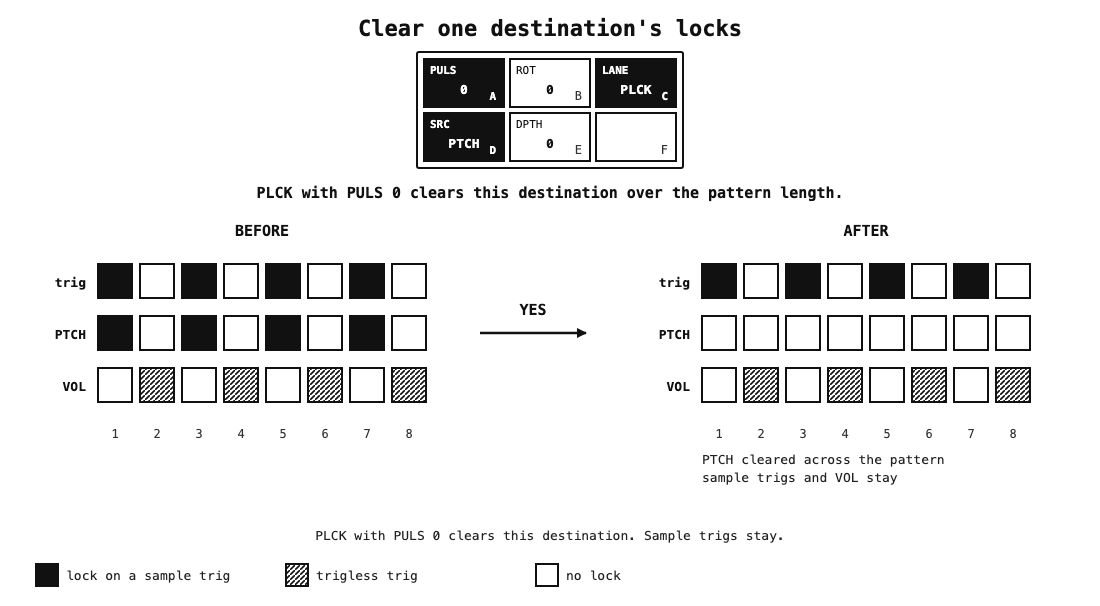
PLCK fill. Track trigs stay. The selected destination clears on every miss, including on steps with a sample or note trig, then writes on PLCK hits. PULS 0 clears this destination across the pattern. Empty trigless trigs drop when nothing else remains on them.
Clear data
To clear one destination's locks, set LANE to PLCK, set PULS
to 0, then press [YES]. Track trigs and other destinations stay.
Empty trigless trigs drop when nothing else remains on the step.
Use the menu to clear existing locks or trigs without writing a new fill.
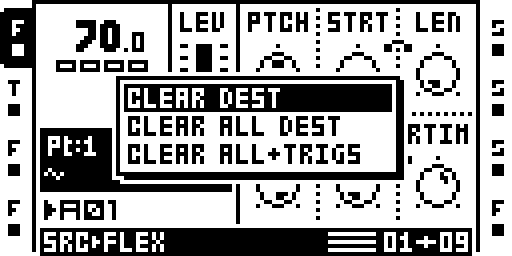
While SEQ is open, press [FUNC] + [BANK] to open the clear
menu. Choose a row and press [YES] once. That row clears and resets
immediately; no second SEQ [YES] is needed. SEQ returns afterward.
| Row | What clears |
|---|---|
| CLEAR DEST | Clear the selected destination's locks. Reset its DPTH, PLCK PULS / ROT, and random step selection; keep track trigs. |
| CLEAR ALL DEST | Clear every SEQ destination's locks on this track. Reset each destination's DPTH, PLCK PULS / ROT, and random step selection; keep track trigs. |
| CLEAR ALL+TRIGS | Clear all destination locks and reset their DPTH / PLCK settings, plus audio sample trigs or MIDI note trigs. Reset TRIG PULS to 5 and ROT to 0. |
These clears affect only the selected track within the current pattern length. Other tracks and patterns keep their data.
The first two rows keep track trigs. Steps with no track trig or remaining
locks become empty. Press [NO] to cancel and return to SEQ. Press
[FUNC] + [BANK] again to close the menu.
Examples
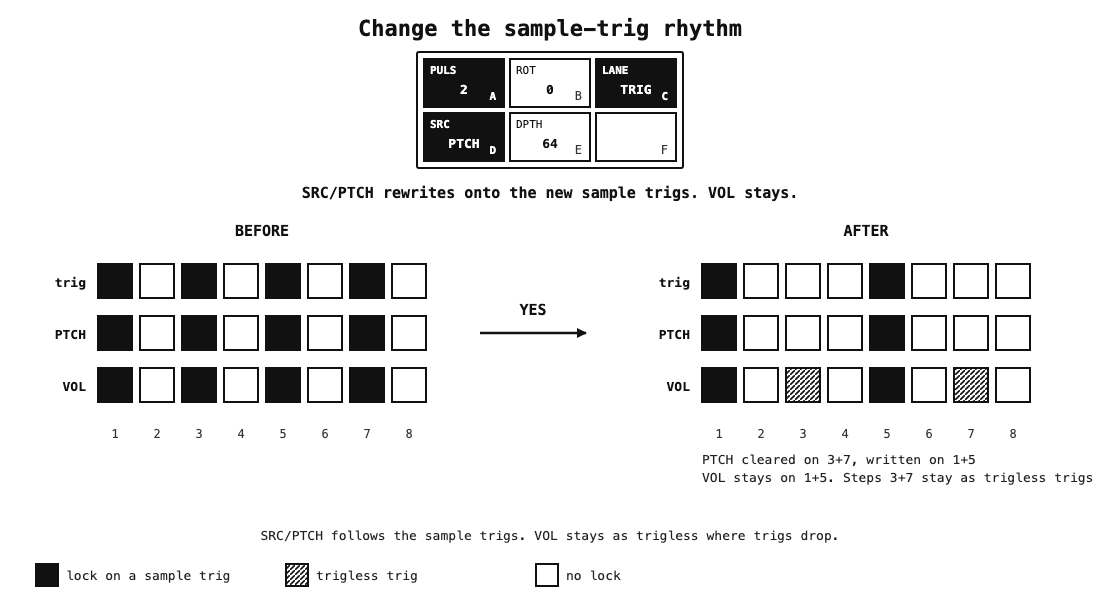
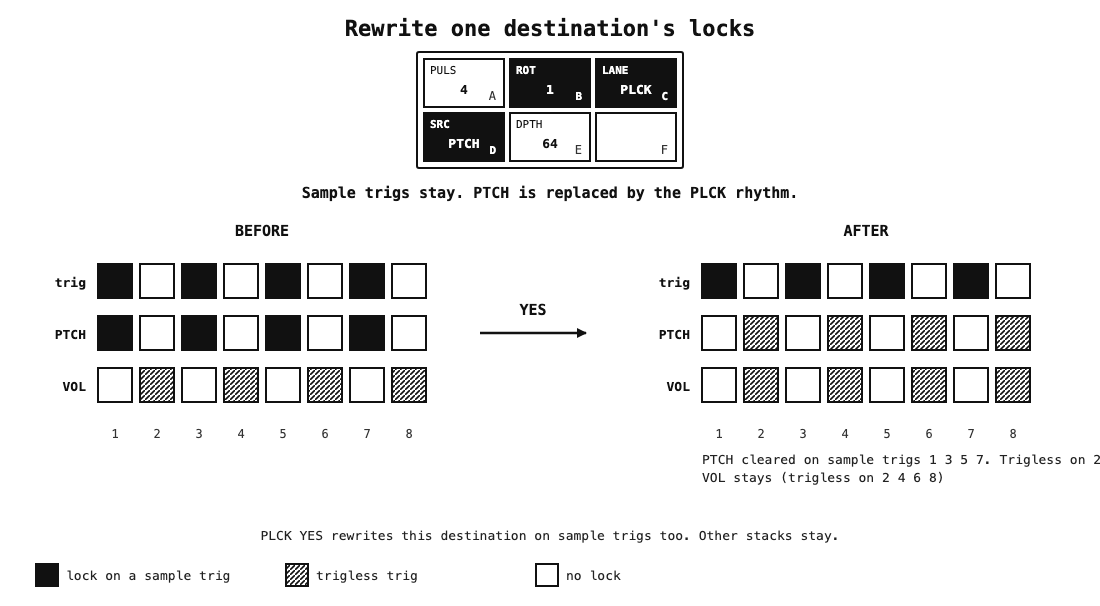
In the figures, black marks a lock on a sample trig, hatching marks a trigless trig, and white marks no lock.
Place sample trigs
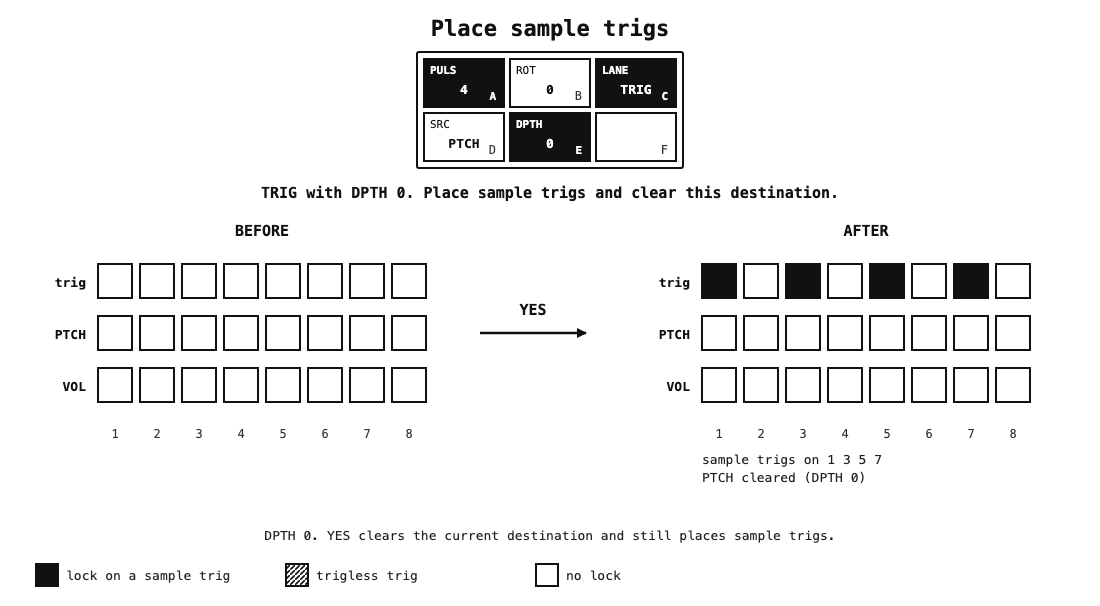
On an empty track, set LANE to TRIG, choose SRC / PTCH with
D, leave DPTH at 0, set PULS, then press [YES]. Sample
trigs land and PTCH locks clear.
Lock pitch on those trigs
Set LANE to TRIG, choose SRC / PTCH, set PULS / ROT
and a non-zero DPTH, then press [YES]. PTCH locks land on the new
sample trigs. The PTCH PLCK PULS / ROT match the TRIG rhythm.
Add volume locks on another rhythm
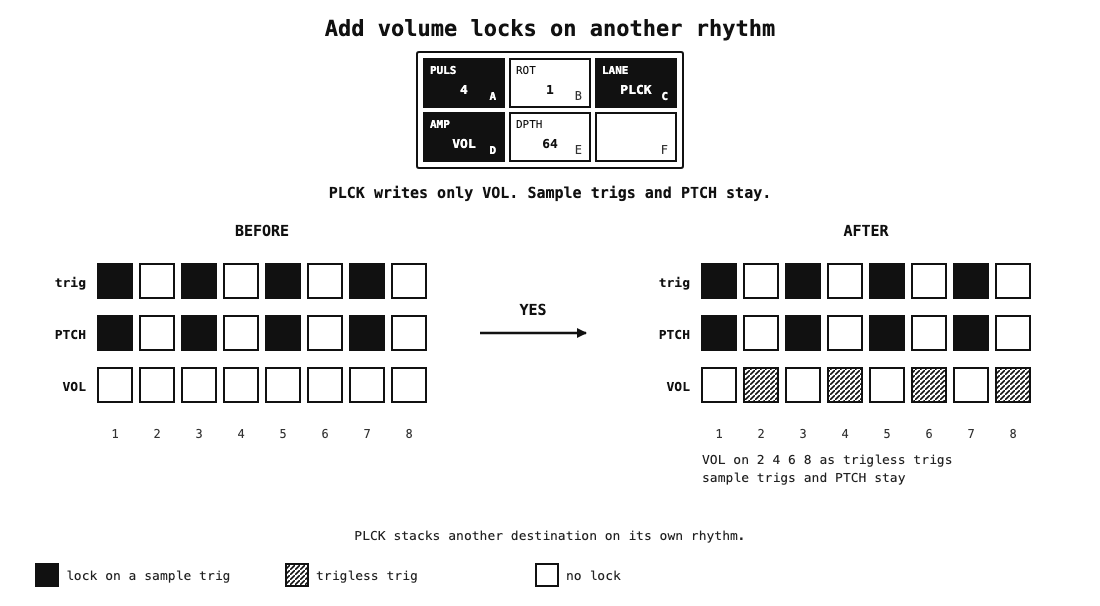
Set LANE to PLCK, choose AMP / VOL, set a different
PULS / ROT, then press [YES]. VOL follows its own PLCK rhythm.
Sample trigs and PTCH locks stay where they are.
Change the sample-trig rhythm
With PTCH and VOL locks on the pattern, set LANE to TRIG, choose
SRC / PTCH, change PULS, then press [YES]. PTCH follows
the new sample trigs. VOL locks stay; steps that lose a sample trig become
trigless trigs if another lock remains.
Rewrite one destination's locks
Set LANE to PLCK, choose SRC / PTCH, change ROT, then
press [YES]. PTCH clears on every PLCK miss, including on sample
trigs. Other destinations stay.
Place random trigs
Focus TRIG or PLCK, set PULS to the hit count, tap [CUE]
to choose those steps at random, then press [YES] to write.
Write MIDI chords
Set the MIDI track's output channel in NOTE SETUP, opened with
[FUNC] + [SRC] or a double-tap of [SRC]. Set the Part's
NOTE to C3. In SEQ, select TRIG, choose NOTE with D, and set
PULS and a non-zero DPTH. Press [RIGHT], choose MAJ for
SCAL, C for ROOT, set VOIC to 3 and CHRD to MAJ0. Set
PHRS to UP and JUMP to 0. The first hit writes C3, E3 and G3;
following hits move upward through the scale. Press [YES] to write
the phrase.
Set VOIC to 1 and fill again to write single notes and clear unused extra-voice locks. USB MIDI output is available when the remix includes USB MIDI and the Octatrack is outside USB DISK MODE.